Linux Server Hardening in the Age of AI: How to Secure Linux Servers Against Automated Attacks
A practical, enterprise-grade guide to Linux server hardening, identity, isolation, detection, recovery, and responsible AI use against automated attacks.
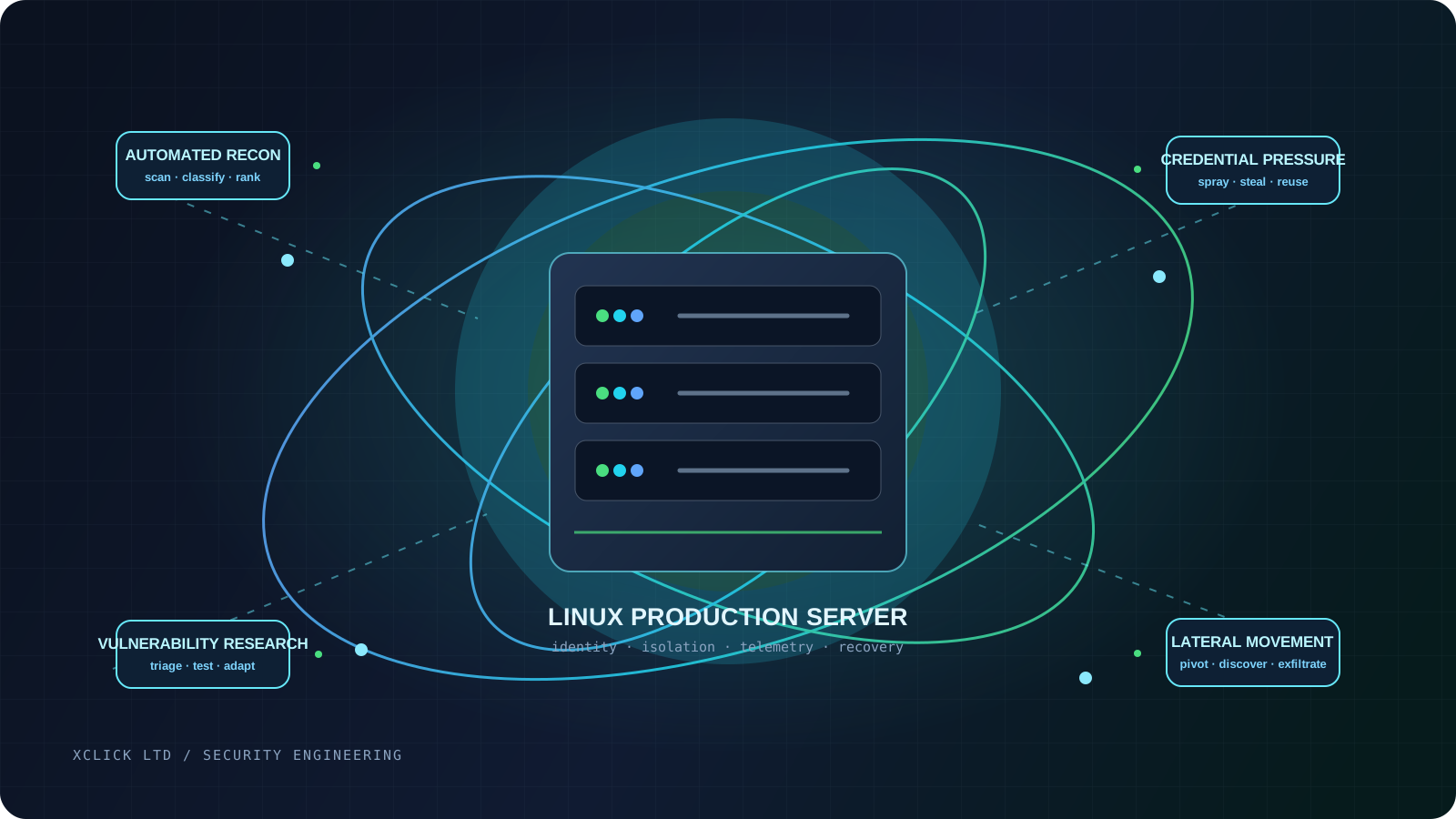
Imagine a production host being discovered before its operator has finished their morning coffee. An automated system identifies the address, fingerprints the services, notices a version mismatch, looks up the public advisories, and ranks the machine beside thousands of similar targets. The first human decision may happen only after the server has already generated an alert—or after it has become an incident.
That is the operational shift behind Linux server security in 2026. Linux remains a dependable substrate for cloud workloads, web applications, databases, containers, and internal platforms, but its flexibility also creates a changing collection of services, identities, packages, sockets, files, and APIs.
Traditional hardening still matters: patch the OS, remove unused services, restrict access, use least privilege, and log what matters. AI-assisted tooling can reduce the time needed to interpret scans, research vulnerabilities, write supporting code, tailor social engineering, and organize post-compromise information.
The response is not to panic or to pretend that a language model can magically defeat a well-configured kernel. It is to make the environment less interesting, less permissive, more observable, and faster to rebuild. In other words, Linux server hardening becomes an exercise in reducing attack paths and shrinking the time between signal, decision, and recovery.
Key takeaway: AI does not make every Linux server instantly vulnerable. It changes the economics of attacking weak infrastructure. Controls that reduce exposure, privilege, persistence, and dwell time therefore become more valuable—not less.
The short answer
Can AI actually hack a Linux server? Sometimes it can help an attacker perform meaningful parts of an intrusion. It cannot, by itself, turn an unknown target into a guaranteed compromise.
The realistic answer is a spectrum:
| Capability | Current reality | Risk to a Linux estate | | --- | --- | --- | | Reconnaissance | Models can summarize public data and classify exposed assets. | More targets can be profiled with less analyst time. | | Port and service analysis | Scanners collect the data; AI can interpret banners and relationships. | Services are triaged faster into likely attack paths. | | Vulnerability research | AI can compare versions, explain advisories, and assist research. | Disclosure-to-exploitation timelines may compress. | | Exploit generation | Models can draft or adapt code, but reliability and context remain uneven. | Known weaknesses may help a broader set of actors. | | Credential attacks | Automation already sprays and stuffs; AI improves targeting and lures. | Valid credentials bypass perimeter assumptions. | | Privilege escalation | AI can research local configuration and propose hypotheses. | Excessive sudo, capabilities, SUID, or secrets are easier to investigate. | | Persistence | Models can explain common mechanisms and organize evidence. | Weakly monitored jobs, services, and keys become footholds. | | Lateral movement | Reporting shows emerging AI assistance deeper in compromised networks. | Flat networks and reused credentials magnify one compromise. | | Fully autonomous compromise | Reliable end-to-end compromise of arbitrary Linux servers is not general. | Treat agents as an emerging risk, not a substitute for evidence. |
The danger is acceleration. If the attacker spends less time moving from discovery to a viable hypothesis, a defender has less time to notice and respond. Strong authentication, a default-deny network posture, service isolation, central telemetry, and tested recovery all make that acceleration less useful.
What changed with AI?
The important distinction is between AI-assisted operations and fully autonomous operations. An assistant can generate a command, but it cannot know whether that command is safe for a production host without context and validation. An agent can chain tools together, but it still meets rate limits, authentication barriers, incomplete inventories, network segmentation, and unexpected system behavior.
That should make the discussion calmer and the engineering more urgent. Google Threat Intelligence reported that the actors it studied were mainly using Gemini for research, troubleshooting, content generation, and basic coding rather than creating novel capabilities. OpenAI similarly described open-source research, translation, coding support, and phishing content, with limited incremental capability beyond existing tools. Attackers gain value from ordinary acceleration before they gain reliable autonomy. See Google Threat Intelligence's adversarial misuse report and OpenAI's report on state-affiliated threat actors.
AI-assisted reconnaissance
Asset discovery still starts with DNS, cloud inventories, certificates, scanners, service banners, repositories, and identity systems. AI can normalize that data, infer relationships, identify technologies, and rank what deserves manual attention. For defenders, anything the inventory cannot explain may become a node in an attack graph: a forgotten development listener, staging hostname, public bucket, or familiar management panel.
AI-assisted vulnerability research
Models can compare vulnerable and patched code, trace inputs, group findings, and translate an advisory into an operational question: “Which public assets run this component, and with what privilege?” Google Threat Intelligence describes AI support for vulnerability discovery and exploit development, while warning that quality remains inconsistent. The practical response is current inventory, vendor advisories, known-exploitation prioritization, and an emergency patch path—not the assumption that every CVE becomes a zero-day. Read Google's 2026 analysis of AI and vulnerability exploitation.
AI-assisted credential attacks
Password spraying, credential stuffing, and phishing predate generative AI. AI can scale target selection, translation, plausible pretexts, and credential prioritization. “We changed SSH to a non-standard port” is therefore not an identity strategy: a valid key, token, cloud credential, or session cookie ignores the port. Use strong authentication, short-lived or centrally managed credentials, MFA for management, separate admin accounts, and clear revocation.
AI-assisted malware development
Threat reporting has documented actors using AI to debug, translate, modify, or iterate on malware and supporting infrastructure. Generated code is not automatically stealthy or reliable, so defenders should monitor behavior: unexpected interpreters, services, child processes, temporary-directory execution, credential-store access, scheduled-job changes, and unusual egress. Keep endpoint, audit, application, and network logs somewhere an intruder cannot quietly rewrite.
Agentic attacks
An agent can receive tools, memory, a goal, and permission to take multiple actions. Its effectiveness still depends on tool permissions, network reach, credentials, safety controls, and observation quality. Anthropic's 2026 analysis of 832 banned accounts reported more AI use in later-stage operations and AI-assisted malware development in 67.3% of its selected cases; it found a smaller group using AI around lateral movement. That is not a population-wide prevalence estimate, but it supports monitoring after initial access, not only phishing. See Anthropic's ATT&CK mapping.
Anthropic also reported a 2025 attempt to use an AI coding environment across reconnaissance, vulnerability discovery, exploitation, lateral movement, and data handling. This shows an emerging pattern, not universal compromise. Define least-privilege boundaries, require approval for consequential actions, and log agents like privileged automation. See that campaign report.
Threat model for a Linux server
Start with the system you have, not an idealized “Linux server.” A public Next.js host, database node, bastion, CI runner, and container host have different trust boundaries.
The threat model should name:
- Internet attackers, opportunistic scanners, botnets, and commodity malware looking for exposed versions, credentials, and services.
- Ransomware and extortion groups pursuing identities, backups, data stores, and high-value workloads.
- Compromised employees, contractors, CI runners, cloud accounts, VPN credentials, or SSH keys, plus insiders exceeding authorization.
- Supply-chain compromise through OS repositories, language packages, container images, build systems, or third-party binaries.
- Cloud-control-plane compromise and vulnerable public applications or management interfaces that turn an application bug into a host problem.
AI amplifies these paths by improving target selection, code and language work, and post-compromise understanding. Your design objective is to ensure that no single opportunity leads directly to unrestricted access, silent persistence, or irreversible impact.
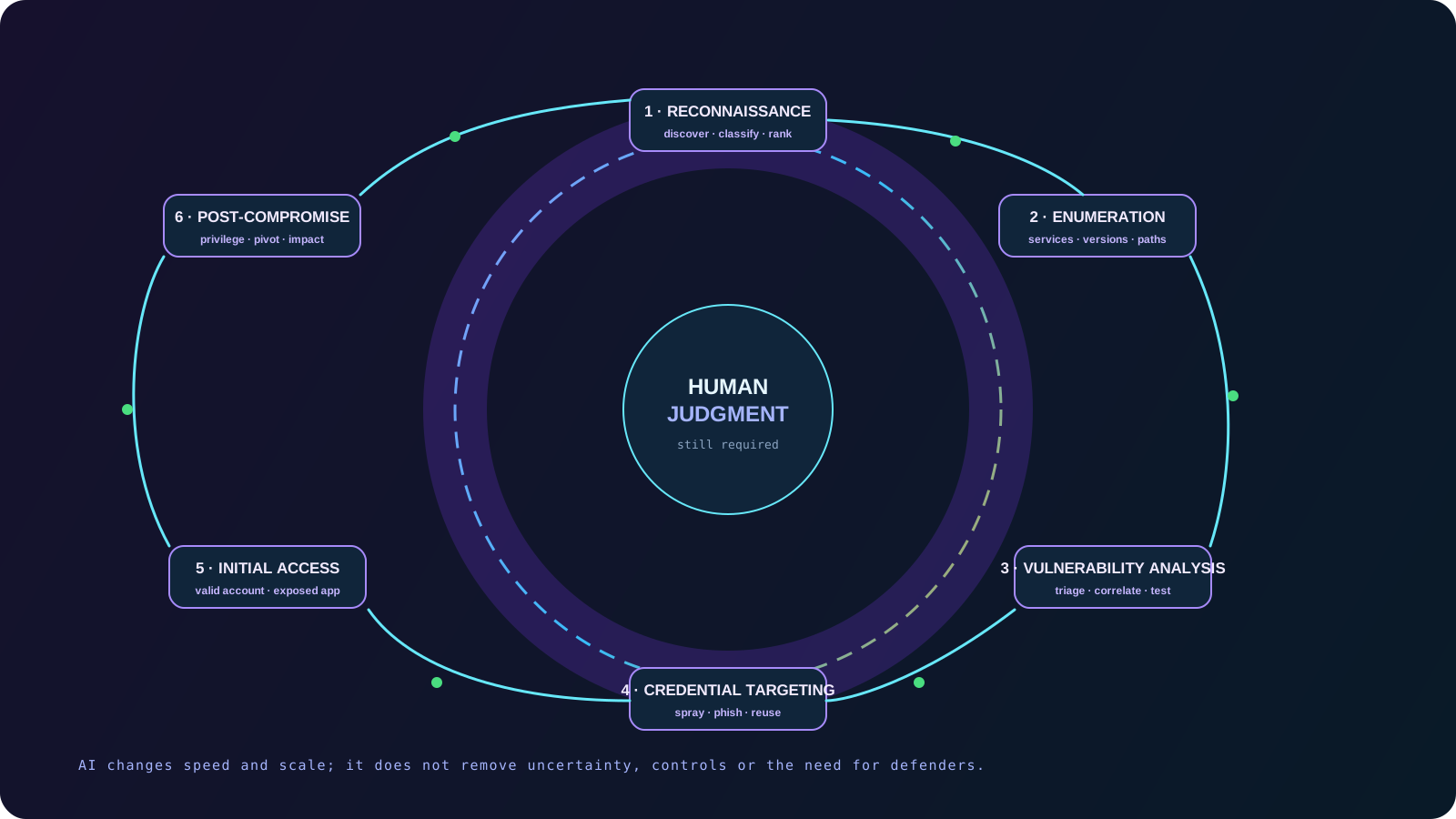
The lifecycle above is a planning model for defenders, not an operational playbook. For each stage, ask three questions:
- What would an attacker need to observe or access?
- Which control prevents or constrains that step?
- Which signal would tell us that the step may be occurring?
NIST's Guide to General Server Security frames server security as a lifecycle of selecting, implementing, and maintaining controls. That last word matters. A server that was hardened once but has drifted for eighteen months is not hardened in any meaningful operational sense.
The layered model for Linux server hardening
Defense in depth is not a pile of products. It is a set of independent constraints around the same workload:
- Physical and cloud infrastructure: trusted images, cloud IAM, security groups, private networking, instance metadata controls, and provider logging.
- Operating system: minimal installation, supported packages, patching, permissions, kernel configuration, and service minimization.
- Identity: SSH keys, MFA, privileged access, sudo policy, service accounts, workload identity, and secrets management.
- Network: host firewall, ingress and egress policy, segmentation, private databases, and management-plane isolation.
- Application: secure production configuration, reverse proxy, TLS, dependency governance, request limits, and secure headers.
- Runtime: systemd boundaries, namespaces, containers, seccomp, capabilities, cgroups, and resource limits.
- Detection: journald, auditd, centralized logging, EDR, IDS/IPS, file-integrity monitoring, and actionable alerting.
- Response and recovery: incident playbooks, evidence preservation, immutable backups, golden images, restoration tests, and lessons learned.
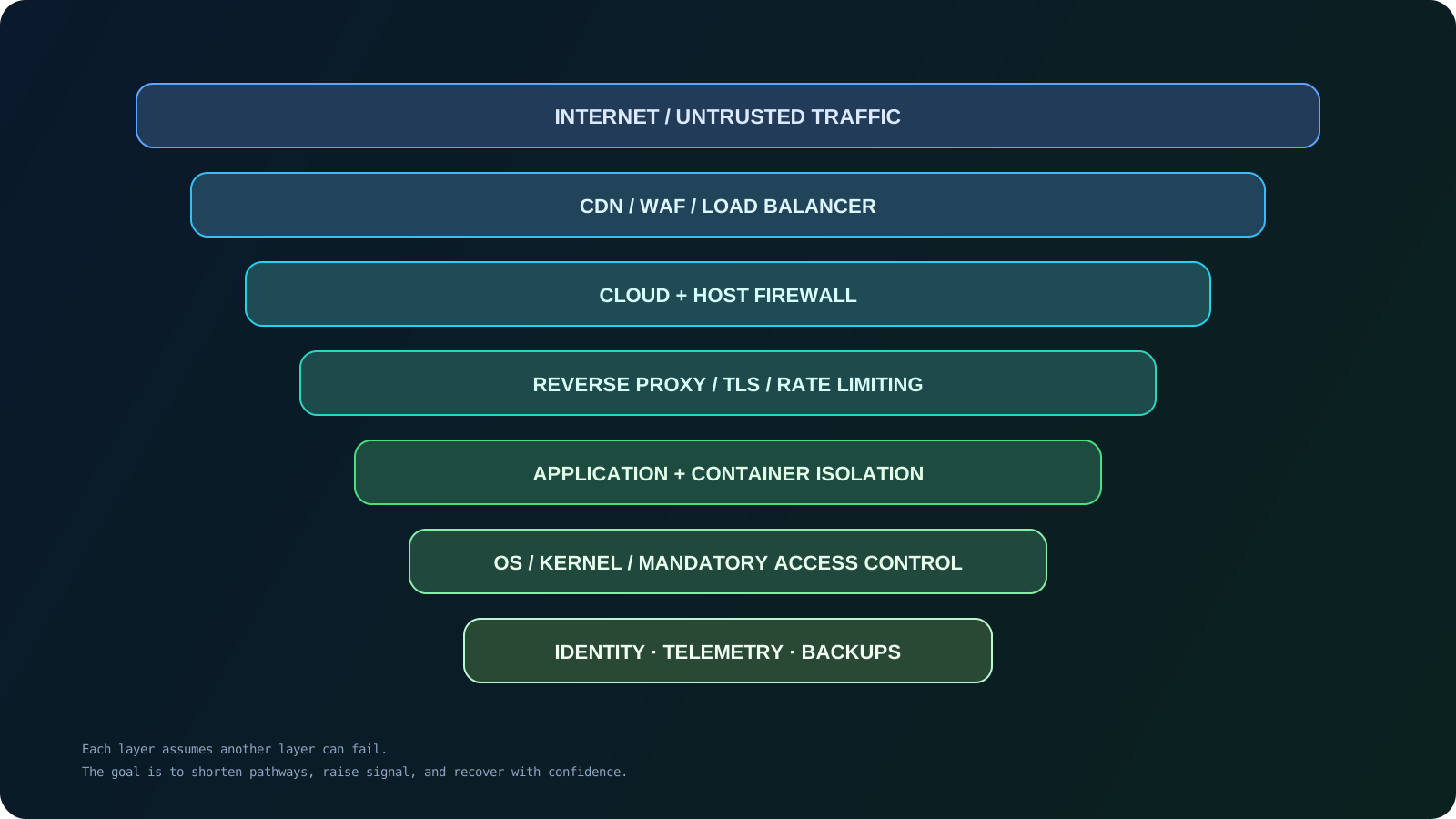
The NIST Cybersecurity Framework 2.0 organizes the same idea as Govern, Identify, Protect, Detect, Respond, and Recover. Use whichever vocabulary helps your team make ownership and evidence explicit.
Reduce the attack surface first
The fastest way to make automated targeting less productive is to stop exposing things that do not need to be reachable. On a host, begin with an inventory rather than a change.
bashss -tulpn systemctl --type=service --state=running --no-pager
ss -tulpn shows listening TCP and UDP sockets, the numeric addresses and ports, and the process associated with each socket when permissions allow it. The second command lists running system services. Compare both results with the intended role of the server and with the cloud provider's security-group rules.
Ask of every listener:
- Is it required for the business function of this host?
- Should it be public, reachable only from a private subnet, or bound to loopback?
- Is it a production service or a development/debug endpoint?
- Does it have a supported version and a named owner?
- Does it run as a dedicated low-privilege account?
- Are authentication, rate limits, and logs enabled?
Pay special attention to databases, admin consoles, metrics endpoints, test servers, Docker APIs, Redis, PostgreSQL, Elasticsearch, and anything bound to 0.0.0.0 or ::. The presence of a service is not proof of compromise, but it is proof that the service belongs in your threat model.
Minimal Linux installation
Choose a supported distribution and a minimal image appropriate to the workload. Keep compilers, debuggers, test fixtures, source trees, and other build tools in CI or a builder image; keep only runtime dependencies in production, with a documented diagnostics path.
Package removal deserves the same care as package installation. Before changing a production host, inspect reverse dependencies and stage the change. For example:
bash# Debian / Ubuntu: inspect a package before considering removal. apt-cache rdepends --installed package-name dpkg-query -W -f='${Package}\t${Version}\n' | sort # RHEL / Rocky / AlmaLinux / Fedora: inspect installed packages. rpm -qa | sort dnf repoquery --installed --whatrequires package-name
The package names are placeholders. Do not guess a package and remove it on a live system: service changes can interrupt boot, networking, monitoring, or remote access. Use configuration management and a rollback path.
Patch management is a security control
Patching is not merely maintenance. It reduces the set of known paths an automated system can test. Maintain an inventory of operating-system versions, kernels, language runtimes, applications, images, and dependencies. Track which assets are public, which contain sensitive data, and which have privileged network access.
On Debian and Ubuntu, a safe first inspection is:
bashsudo apt update apt list --upgradable ubuntu-security-status 2>/dev/null || true
On RHEL-family systems:
bashsudo dnf check-update || test "$?" -eq 100 sudo dnf updateinfo list updates security
The commands inspect available updates; they do not apply them. The exit code from dnf check-update can be 100 when updates exist, so automation should handle that deliberately rather than treating it as an infrastructure failure.
Ubuntu documents unattended-upgrades as installed and enabled by default on current server releases, while also documenting controls for package origins, reboots, and logging. That is a useful default, not a complete patch strategy. Review Ubuntu's automatic-updates documentation and define maintenance windows, reboot ownership, kernel-live-patching decisions, and emergency change procedures.
Do not rank solely by CVSS. A medium-severity issue on a public, privileged service may deserve attention before a critical issue on an isolated, unreachable development node. A practical priority score considers:
- evidence of active exploitation, including CISA's Known Exploited Vulnerabilities Catalog;
- public exposure and reachable attack paths;
- privileges required and the privilege of the affected process;
- asset criticality, data sensitivity, and blast radius;
- exploit maturity and compensating controls; and
- time since disclosure and the organization's ability to patch or isolate.
Record exceptions with an owner, an expiry date, and a compensating control. “We cannot patch it this quarter” is a business decision; it should not become an undocumented permanent state.
Identity, SSH, and credentials
SSH hardening
SSH is the administrative front door on many hosts. Treat it as a management-plane service: expose it only to a private network or bastion where possible, require strong authentication, restrict identities, and log success and failure.
OpenSSH supports AllowUsers, AllowGroups, AuthenticationMethods, and DisableForwarding. Defaults vary by version, so validate against the installed sshd_config(5) manual and distribution documentation; the OpenBSD OpenSSH manual is a useful directive reference.
A conservative starting point for a host whose administrators already use working keys might look like this:
text# /etc/ssh/sshd_config.d/10-hardening.conf PermitRootLogin no PubkeyAuthentication yes PasswordAuthentication no KbdInteractiveAuthentication no AllowGroups ssh-admins X11Forwarding no AllowTcpForwarding no ClientAliveInterval 300 ClientAliveCountMax 2 LogLevel VERBOSE
This is not a universal drop-in. If MFA uses PAM or keyboard-interactive authentication, disabling KbdInteractiveAuthentication may disable the second factor. If a workflow requires forwarding, design a narrower alternative before disabling it globally.
Before changing authentication, verify a named admin account and tested key, keep a second session open, run sudo sshd -t, inspect effective settings with sudo sshd -T, and retain console or out-of-band recovery.
Warning: disabling password authentication, changing AllowUsers or AllowGroups, or restricting the management network can lock every administrator out. Test a second session and confirm the provider console or break-glass path first.
Changing the SSH port can reduce noise in low-value logs, but it is not authentication, authorization, or encryption. Treat it as an operational choice, never as the hardening boundary.
SSH keys and privileged credentials
Private keys are credentials. Protect them with strict permissions and, for high-risk access, hardware-backed authenticators or managed SSH certificates. Avoid sharing one long-lived key between people, laptops, CI, and servers.
On a Linux workstation, basic local permissions may include:
bashchmod 700 ~/.ssh chmod 600 ~/.ssh/authorized_keys chmod 600 ~/.ssh/id_ed25519 chmod 644 ~/.ssh/id_ed25519.pub
Permissions do not save a key copied into a ticket, repository, image layer, or untrusted agent. Inventory owner, purpose, review, and revocation; rotate after compromise.
Use ssh-agent carefully: forwarding makes the agent available to a remote session. Prefer short-lived certificates, a dedicated bastion, or a proxy without forwarding where possible.
At scale, combine Linux accounts with centralized identity, PAM, MFA, just-in-time privilege, appropriate session recording, and tested break-glass access. A hardened OS still falls to a valid privileged credential.
Network controls and segmentation
Host firewalls and cloud firewalls
Use both cloud/network controls and a host firewall. Security groups can stop traffic before the instance; the host firewall adds a boundary if a rule or interface changes.
On Ubuntu, ufw is a convenient frontend. Inspect before changing:
bashsudo ufw status verbose sudo ufw show added
If you must change policy, use the exact management CIDR rather than a broad internet-wide rule. The following uses 198.51.100.0/24, a documentation-only example network:
bash# Review and adapt these rules in a maintenance window. sudo ufw allow from 198.51.100.0/24 to any port 22 proto tcp sudo ufw allow 443/tcp sudo ufw status numbered
Only after a second management path is proven should an administrator consider a default-deny policy:
bashsudo ufw default deny incoming sudo ufw default deny routed sudo ufw default allow outgoing sudo ufw enable
Outbound policy depends on the workload. Default-allow is easier to operate but gives a compromised process more freedom to call out, fetch, or exfiltrate. High-value environments should define destinations and use egress controls, DNS logging, and proxy policy where practical.
On RHEL-family systems, firewalld commonly manages nftables rules; on newer distributions, nftables may be managed directly. iptables commands can still exist as a compatibility layer. Do not mix multiple rule managers without knowing which one owns the active ruleset. Review the distribution's firewall documentation and persist the source of truth in configuration management.
Segmentation
An internet-facing application server should not accept arbitrary connections from every other system. A useful baseline is:
textInternet ↓ WAF / CDN / Load Balancer ↓ Reverse Proxy ↓ Application Server ↓ Private API / Worker Network ↓ Private Database and Cache
The database should have no public route. Administrative access should traverse a bastion or private access service. Allow east-west traffic explicitly by service identity, network policy, or security group; a shared VPC is not a trust boundary.
Segmentation limits what happens after one service is compromised. It does not replace authentication between services. Use workload identity, mutual TLS where appropriate, short-lived credentials, and authorization at the API boundary. NIST's SP 800-207 Zero Trust Architecture makes the same conceptual point: network location should not create implicit trust.
Filesystem and permission security
Unix permissions are a powerful, low-cost control when designed around ownership and data flow. Review:
- who owns application code, configuration, uploads, logs, sockets, and backups;
- which directories need to be writable at runtime;
- whether secrets are readable by the service account and no broader audience;
- whether
umaskprevents new files from becoming group- or world-readable; - where SUID and SGID bits exist; and
- whether world-writable directories have the sticky bit and an operational reason to exist.
Safe inspection commands include:
bashid umask namei -l /path/to/sensitive/file stat -c '%A %a %U:%G %n' /path/to/sensitive/file find /etc /opt /srv -xdev -type f -perm /022 -print 2>/dev/null
Do not “fix” permissions with recursive chmod across /, /etc, or an unfamiliar application tree. Blanket changes can break SSH, package management, TLS, sockets, or updates. Inventory first, change one class of files, and test.
SUID and SGID auditing
SUID runs an executable with the file owner's effective identity; SGID can grant the file owner's group. Both have legitimate uses but increase the consequence of a vulnerable or mis-owned binary.
bashsudo find / -xdev -type f -perm -4000 -printf '%m %u:%g %p\n' 2>/dev/null | sort sudo find / -xdev -type f -perm -2000 -printf '%m %u:%g %p\n' 2>/dev/null | sort
For each result, verify package ownership, checksum, and workload need. Unexpected SUID binaries—especially outside standard paths or inside writable application directories—are investigation signals. Do not remove every bit blindly; make the exceptional set small, explainable, and monitored.
OS, kernel, and service isolation
systemd as a service boundary
systemd can enforce more than startup order: dedicated users, reduced capabilities, private temporary directories, read-only filesystems, and no privilege gain. These settings complement SELinux or AppArmor. The example below assumes a Node.js service that writes only to /srv/example-app/data; test it against the actual application.
ini# /etc/systemd/system/example-web.service [Unit] Description=Example production web service After=network-online.target Wants=network-online.target [Service] Type=simple User=example-web Group=example-web WorkingDirectory=/srv/example-app Environment=NODE_ENV=production ExecStart=/usr/bin/node /srv/example-app/server.js Restart=on-failure RestartSec=5s NoNewPrivileges=yes PrivateTmp=yes PrivateDevices=yes ProtectSystem=strict ProtectHome=yes ProtectKernelTunables=yes ProtectKernelModules=yes ProtectControlGroups=yes RestrictSUIDSGID=yes LockPersonality=yes CapabilityBoundingSet= AmbientCapabilities= RestrictAddressFamilies=AF_UNIX AF_INET AF_INET6 ReadWritePaths=/srv/example-app/data [Install] WantedBy=multi-user.target
ProtectSystem=strict makes the hierarchy read-only except for ReadWritePaths; NoNewPrivileges blocks SUID and file-capability gains; PrivateDevices hides most device nodes; and RestrictAddressFamilies narrows socket families.
Do not copy all hardening directives into every unit. A database, reverse proxy, backup agent, and monitoring daemon have different requirements. Start with:
bashsudo systemd-analyze security example-web.service sudo systemctl cat example-web.service sudo systemctl show example-web.service --property=User,Group,CapabilityBoundingSet,NoNewPrivileges,ProtectSystem,ProtectHome
Test startup, health checks, logging, reloads, uploads, outbound calls, and backups. A high systemd-analyze security score is not proof; inspect which boundaries actually apply.
Kernel security
The kernel is the ultimate boundary of a traditional Linux system. Keep it supported and patched, and understand which protections the distribution enables:
- ASLR: makes memory layout less predictable for many memory-corruption attacks.
- Namespaces and cgroups: isolate resource views and constrain CPU, memory, and process count.
- Seccomp: restricts the system calls available to a process. The kernel seccomp documentation describes it as an opt-in mechanism that reduces the set of kernel entry points a process can use.
- Capabilities: split parts of traditional root privilege into narrower permissions.
- Lockdown, signed modules, and LSMs: can restrict sensitive kernel interfaces, module loading, and application behavior.
- eBPF controls: govern who may load programs and audit privileged access to a powerful kernel extension mechanism.
The Linux kernel self-protection documentation emphasizes reducing attack surface, restricting system calls, and controlling module loading. Record exceptions and compensating controls rather than disabling protections casually.
SELinux vs AppArmor
Both supplement traditional DAC permissions. Neither is universally superior; choose the one your platform and team can operate continuously.
| Feature | SELinux | AppArmor | | --- | --- | --- | | Model | Label- and policy-based mandatory access control. | Path- and profile-based mandatory access control. | | Policy style | Rich type enforcement with roles and optional MLS/MCS concepts. | Per-program profiles describing allowed files, capabilities, and operations. | | Common distributions | Enforcing by default or strongly integrated on RHEL, Fedora, and related platforms. | Installed and loaded by default on Ubuntu and common Debian-derived deployments. | | Learning curve | Higher; labels, contexts, booleans, and policy modules require specialist familiarity. | Often easier to start with for individual applications, while complex estates still require expertise. | | Enterprise adoption | Deep integration in Red Hat platforms, containers, and regulated environments. | Strong integration in Ubuntu and useful for application-focused confinement. | | Operational requirement | Keep policy, labels, audit review, and exception management in configuration control. | Keep profiles, complain/enforce transitions, and profile exceptions in configuration control. |
On Ubuntu, inspect AppArmor with sudo aa-status; on RHEL-family systems, use getenforce, sestatus, and audit logs. A denial is a diagnosis prompt, not a reason to disable the control.
Linux capabilities
The traditional statement “root is unrestricted” is a useful warning, but modern Linux often evaluates a process through capability sets as well as UID. In a container or service unit, a process may run as UID 0 inside its namespace while having a reduced capability set.
The high-impact capabilities deserve particular attention:
CAP_NET_ADMINcan change interfaces, routes, and network policy.CAP_NET_RAWcan create raw packets and is rarely necessary for ordinary web applications.CAP_SYS_ADMINis exceptionally broad and is often described as a “new root” class of capability.CAP_SYS_PTRACEcan inspect or interfere with other processes and should not be casually granted.
Inspect rather than guess:
bashgetcap -r /usr /bin /sbin 2>/dev/null capsh --print 2>/dev/null | sed -n '1,80p'
For containers, prefer dropping all capabilities and adding back only those the application demonstrably requires. For systemd, use CapabilityBoundingSet= and AmbientCapabilities= deliberately. A capability is not harmless simply because it is narrower than full root.
Visibility, detection, and recovery
Prevention is necessary but insufficient. Assume a credential, dependency, service, or control will eventually fail. The question is whether that failure becomes a contained alert or a quiet business interruption.
Logging and auditing
Collect SSH and sudo events, account and key changes, service and unit changes, kernel and LSM denials, application authentication and authorization, sensitive DNS/egress, and critical configuration or backup changes.
journald is a useful local source; rsyslog, an agent, or EDR can forward events centrally. Do not depend on a log an attacker with root can alter.
bashsudo journalctl -u ssh --since today --no-pager sudo journalctl -u sshd --since today --no-pager sudo journalctl -p warning..alert --since '24 hours ago' --no-pager sudo last sudo lastlog sudo ausearch -m USER_LOGIN -ts recent 2>/dev/null
The unit name varies: ssh is common on Debian/Ubuntu and sshd on RHEL-family systems. Confirm it before building an alert.
Centralize logs with synchronized time, access control, appropriate retention, and an ingestion-health alert. A missing stream may be a monitoring failure or a security signal.
Detection priorities
Useful detections include a new public listener; unusual successful logins or failures followed by success; privilege escalation outside a maintenance window; new SUID/SGID files, units, timers, cron entries, keys, or startup changes; an application spawning an unexpected shell or interpreter; execution from temporary paths; unusual database/worker egress; and backup or snapshot-policy changes.
Do not alert on every sudo or failed login. Use role baselines, maintenance windows, and risk-based thresholds so the team can act on the signal.
File integrity monitoring
Tools such as AIDE, Tripwire, OSSEC/Wazuh, and EDR platforms can maintain integrity baselines. Monitor identity files, /etc/ssh, authorized keys, sudo policy, systemd and cron definitions, web/deployment paths, package lockfiles, and backup scripts.
Store baselines and alerts outside the host or make them tamper-evident. A baseline that can be silently rewritten after compromise is not trustworthy.
Backups and recovery
Use 3-2-1 as a starting point: multiple copies, different storage, and at least one copy isolated from routine access. Encrypt backups, separate backup administration, and protect deletion or retention changes.
CISA's #StopRansomware Guide recommends offline, encrypted backups and regular tests of availability and integrity. Immutable object storage can help, but immutability is not a substitute for correct scope, key protection, retention review, and a tested restore process.
For databases, test point-in-time recovery and application-consistent backups. For servers, maintain golden images or IaC that can rebuild without trusting the current disk. An untested backup is an assumption, not a recovery capability.
Containers and Docker security
Containers package processes and dependencies; they do not make the host disappear. Include the runtime, kernel, image supply chain, mounts, and credentials in the same threat model.
Prioritize:
- rootless containers or user-namespace remapping where the workload supports it;
- minimal, pinned images from trusted registries;
- image scanning and signature or provenance verification;
- non-root
USERdirectives inside images; - read-only root filesystems with explicit writable volumes;
- dropped Linux capabilities and default seccomp/AppArmor/SELinux profiles;
- resource limits such as process, memory, and CPU limits;
- network segmentation between workloads; and
- secrets delivered at runtime rather than embedded in image layers or environment files committed to source control.
Docker's rootless documentation explains how running the daemon and containers without root can reduce impact. Its security guidance explains why Docker control is powerful: a trusted client can create mounts and containers with host-level consequences.
The Docker daemon socket is particularly sensitive:
text/var/run/docker.sock
Control of a rootful daemon can expose host filesystems, start privileged workloads, or change the runtime. Do not mount the socket into an application for convenience. If remote administration is required, use protected SSH or mutual TLS as described in Docker's daemon-access guidance, and restrict the operator identity.
A constrained container example might look like this, but must be tested against the image and workload:
bashdocker run --rm \ --read-only \ --cap-drop=ALL \ --security-opt=no-new-privileges:true \ --pids-limit=256 \ --memory=512m \ --tmpfs /tmp:rw,noexec,nosuid,size=64m \ example/app:1.4.2
Do not add --privileged as a troubleshooting shortcut. If an application needs a capability, device, host mount, or unrestricted seccomp profile, record why, narrow the exception, and treat it as a significant risk.
Next.js and Node.js production server security
xClick's own stack makes this practical. A Next.js application should be one workload inside a larger architecture:
textInternet ↓ Cloud Firewall ↓ Reverse Proxy / CDN / WAF ↓ Next.js Application (non-root) ↓ Internal APIs and workers ↓ Private database, cache, and queue
Next.js recommends using a reverse proxy when self-hosting because it can handle malformed requests, slow connections, payload limits, and rate limiting before the application server spends resources on them. See the Next.js self-hosting guide.
For a production Node.js service:
- run the process as a dedicated non-root user and build in CI or a builder image;
- set
NODE_ENV=productionand never expose the development server; - terminate TLS at a managed edge or hardened reverse proxy;
- keep secrets server-side; use lockfiles and repeatable installs such as
npm ci; - audit dependencies in CI, and configure request limits, rate limits, headers, and source-map exposure deliberately; and
- supervise the process and emit structured logs without passwords, tokens, session cookies, or unnecessary personal data.
Next.js documents environment-variable boundaries and recommends keeping .env.* files out of source control in its production checklist. Use a CSP that matches the application; do not paste a permissive policy containing unsafe-eval or unsafe-inline without understanding the tradeoff.
For dependency checks, npm audit can identify advisories in the dependency tree. The npm audit documentation warns that npm audit fix runs an install and may change the dependency tree, so review it as a code change rather than executing it blindly on a production host:
bashnpm ci npm audit --audit-level=high npm outdated
An audit is not proof that an application is secure; review reachability, authentication, authorization, input handling, defaults, and deployment configuration too.
Secrets management
Environment variables are a delivery mechanism, not a complete secrets-management system. They can appear in process inspection, crash reports, deployment logs, container metadata, or support bundles. A .env file still needs controlled permissions, distribution, rotation, and storage—and must not be committed.
Prefer a secret manager or cloud-native secret service that provides:
- access policies tied to workload identity;
- short-lived credentials where the service supports them;
- audit logs for reads and changes;
- rotation and revocation without rebuilding every artifact;
- separate values per environment; and
- a way to prevent secrets from entering CI logs and image layers.
Vault and cloud secret managers are implementation options, not the design. Give each service only the secrets it needs; never give a web process an account-wide cloud role because an SDK needs credentials.
When a secret is exposed, rotate it while preserving evidence and dependencies. Check repositories, CI variables, image layers, manifests, backups, logs, and developer machines; deleting the current file does not remove Git history or a pushed image layer.
Cron, systemd timers, and scheduled jobs
Scheduled tasks are legitimate automation and common persistence locations. Audit both traditional cron and systemd timers:
bashcrontab -l 2>/dev/null || true sudo crontab -l 2>/dev/null || true sudo find /etc/cron.d /etc/cron.daily /etc/cron.hourly /etc/cron.weekly /etc/cron.monthly -maxdepth 1 -type f -ls 2>/dev/null systemctl list-timers --all --no-pager
For each job, record its owner, executable path, input data, environment, output, network access, and failure behavior. Ensure scripts and parent directories are not writable by the account that executes them or by a broad application group. Use absolute paths, a controlled PATH, restrictive permissions, and a dedicated service account. Prefer systemd timers when the service needs unit-level sandboxing, resource limits, dependency ordering, and journal integration.
Unexpected jobs, newly modified scripts, and schedule changes outside a deployment window deserve review. This is defensive auditing; do not turn it into a catalog of persistence tricks.
Process and resource monitoring
Use ordinary operating-system tools as a repeatable first view:
bashps aux --forest top -b -n 1 | sed -n '1,35p' systemctl --failed --no-pager ss -tpn sudo lsof -nP -i journalctl --since '30 minutes ago' --no-pager
Look for unknown processes, execution from temporary directories, unexpected parent-child relationships, high CPU or memory, deleted-but-open files, listeners that do not belong to the service inventory, and outbound connections from a workload that normally serves local requests only.
A single suspicious process is not proof of an intrusion. Record the PID, command line, executable path, parent process, user, start time, open files, connections, and related logs before making disruptive changes. If the host is in an active incident, follow the organization's incident-response plan and preserve evidence.
Supply-chain security
The server can be correctly configured and still run compromised software. Apply provenance and review to:
- distribution repositories and third-party package sources;
- npm, Python, Go, and other language dependencies;
- container images and base images;
- vendor agents and downloaded binaries;
- CI runners, build plugins, and deployment actions; and
- infrastructure modules, Helm charts, and automation roles.
Maintain a software inventory and an SBOM for important applications. Pin versions where repeatability matters, verify checksums or signatures where the ecosystem supports them, review maintainer and release changes, and scan the result. A lockfile reduces surprise; it does not guarantee that every dependency is trustworthy or that a lockfile itself is reviewed.
Protect the build pipeline with isolated runners, short-lived credentials, branch protections, artifact provenance, and separation between build and deploy permissions. A malicious dependency that runs during installation can access more than the final application process, so keep CI secrets and network access narrow.
AI-assisted defensive security
The same acceleration can help defenders handle logs, advisories, and configuration evidence. Use AI as a constrained analyst and drafting assistant for:
- summarizing logs and grouping similar events;
- correlating advisories with the software inventory;
- comparing configuration with a reviewed baseline;
- drafting detection rules, audit queries, and incident timelines;
- reviewing infrastructure-as-code and translating security documentation; and
- producing runbooks, test cases, and change-review questions.
Keep sensitive logs, credentials, source code, and regulated data out of external models unless policy permits it. Redact identifiers and preserve original evidence in a controlled system.
Never blindly execute AI-generated security commands in production. Models can hallucinate package names, configuration directives, CVEs, file paths, and compatibility assumptions. A safe review loop is:
- Ask for assumptions and expected effect.
- Check every directive against the installed distribution and version.
- Test in a disposable or staging environment.
- Use a second management session and a rollback path for network or authentication changes.
- Review the diff and resulting logs.
- Deploy through version-controlled configuration management when the change is approved.
AI should make expert review faster, not make expert review optional.

AI-assisted hardening workflow
Make the lifecycle explicit:
textInventory ↓ Attack-surface discovery ↓ Vulnerability assessment ↓ Risk prioritization ↓ Hardening ↓ Automated validation ↓ Continuous monitoring ↓ Incident response ↓ Continuous improvement
AI can assist with each stage, but the control boundary remains clear:
- Inventory: normalize data and flag unexplained listeners; a human owns the source of truth.
- Discovery and assessment: group services, map advisories, and suggest reachability; an engineer validates exposure and exploitability.
- Prioritization: rank exposure, privilege, impact, and active exploitation; a risk owner accepts exceptions.
- Hardening and validation: draft policy, run tests, and compare evidence; an engineer approves changes.
- Monitoring and response: cluster alerts and build timelines; an analyst or incident commander authorizes action.
- Improvement: turn lessons into tests and runbooks; the organization owns the decision.
Linux server hardening checklist
Use this as a review aid, not a substitute for an asset-specific threat model.
Identity
- [ ] Root SSH login is disabled, with a tested alternative administrative path.
- [ ] Password authentication is disabled where key- or MFA-based access is ready and supported.
- [ ] SSH keys are inventoried, protected, rotated, and revocable.
- [ ] Administrative access requires MFA or an equivalent strong control where supported.
- [ ] Privileged work uses dedicated administrator accounts.
- [ ]
sudorules are narrow, reviewed, and logged. - [ ] Stale users, groups, keys, tokens, and service accounts are removed or disabled.
- [ ] Break-glass access is protected, logged, and tested.
Network
- [ ] Cloud security groups and host firewalls are enabled and owned by configuration management.
- [ ] Every public listener has a documented owner and purpose.
- [ ] Unnecessary ports and management interfaces are closed or restricted.
- [ ] Databases, caches, queues, and internal admin tools are private.
- [ ] SSH is limited to a management network or bastion where practical.
- [ ] East-west traffic follows explicit service-to-service policy.
- [ ] Egress is monitored and restricted according to workload requirements.
Operating system
- [ ] The OS and kernel are supported and receiving security updates.
- [ ] Security updates, reboots, and exceptions have clear ownership.
- [ ] Unnecessary packages and services are removed only after dependency review.
- [ ] Filesystem ownership,
umask, world-writable paths, SUID, and SGID are reviewed. - [ ] SELinux or AppArmor is enabled and policy exceptions are documented.
- [ ] Systemd services use dedicated users and appropriate sandboxing.
Application
- [ ] Production mode is enabled; development servers and debug endpoints are not public.
- [ ] The process runs as a non-root user.
- [ ] A reverse proxy or managed edge handles TLS, request limits, and rate limiting.
- [ ] Secrets are not committed, hardcoded, printed, or embedded in images.
- [ ] Dependencies are pinned, audited, and updated through reviewable changes.
- [ ] Security headers and CSP are configured for the actual application.
- [ ] Application, authentication, and authorization events are logged without sensitive values.
Containers
- [ ] Rootless or user-namespace isolation is used where practical.
- [ ] Base and application images are minimal, pinned, scanned, and provenance-checked.
- [ ] Containers run as non-root where the application permits.
- [ ] Unneeded capabilities are dropped;
--privilegedis not used casually. - [ ] Read-only filesystems and resource limits are applied where compatible.
- [ ] Default seccomp and LSM profiles remain enabled unless an exception is reviewed.
- [ ] The Docker socket and runtime APIs are restricted to trusted operators.
- [ ] Secrets are delivered at runtime and excluded from image layers.
Monitoring
- [ ] journald or equivalent logs are collected centrally.
- [ ] SSH, sudo, account, service, kernel, and application events are searchable.
- [ ] Time is synchronized and log ingestion health is monitored.
- [ ] Alerts cover new listeners, privilege changes, persistence locations, and unusual egress.
- [ ] File-integrity or EDR coverage protects critical paths.
- [ ] Security alerts have an owner, severity, and response playbook.
Recovery
- [ ] Backups are encrypted and access-controlled.
- [ ] At least one backup copy is offline or immutable.
- [ ] Database restoration and point-in-time recovery have been tested.
- [ ] Golden images or infrastructure-as-code can rebuild the host.
- [ ] Recovery objectives and service priorities are documented.
- [ ] Incident-response and recovery exercises include credential rotation and adjacent systems.
A 30-minute Linux hardening baseline
This quick start creates visibility and reduces obvious exposure; it does not replace engineering.
Minutes 0–5: inventory. Record the host role, security-group rules, management network, and access paths. Run:
bashhostnamectl ss -tulpn systemctl --type=service --state=running --no-pager
Minutes 5–10: inspect patch state. On Debian/Ubuntu run sudo apt update && apt list --upgradable; on RHEL-family systems run sudo dnf check-update. Plan the patch and reboot.
Minutes 10–15: validate identity. Confirm a named non-root administrator, working key, narrow sudo access, and owned stale-key cleanup. Test a second session and recovery path before disabling passwords.
Minutes 15–20: close exposure. Restrict SSH to the management CIDR, confirm only required web ports are public, and verify that databases, Redis, Docker APIs, and admin panels are private. Use the cloud firewall and host firewall together.
Minutes 20–25: check privilege and processes. Review sudo -l, SUID/SGID results, failed units, and processes from temporary or unexplained paths.
Minutes 25–30: turn on evidence. Confirm journalctl contains SSH and service events, forward logs to a central destination, verify a recent backup, and write down the next actions: patch, isolate, add MFA, tune systemd, scan dependencies, or test restore.
If you cannot explain the host's ports, accounts, services, logs, and backups, more changes may increase uncertainty rather than security.
Enterprise hardening baseline
Fleet-scale security needs repeatable ownership and evidence:
- Centralize identity through a directory or provider; integrate PAM, MFA, dedicated admin accounts, just-in-time elevation, session logging, and revocation.
- Build private-by-default networks with segmented subnets, restricted security groups, bastions or private access brokers, workload identity, and egress policy.
- Maintain supported golden images with hardened defaults, a tested kernel strategy, and role-required packages; express SSH, firewall, systemd, container, and logging policy as code with Ansible, cloud-init, Packer, or equivalents.
- Scan code, dependencies, containers, images, and IaC in CI; keep secrets in a managed system with rotation, audit, and short-lived credentials.
- Send host, cloud, identity, application, and network telemetry to a SIEM; use EDR where justified.
- Define vulnerability SLAs by exposure and exploitation, not one severity score.
- Maintain tested backup, restore, rebuild, and incident-communication procedures; measure drift in packages, listeners, policies, identities, logs, and backups.
Manual hardening does not scale because it cannot prove that every host stayed in the intended state. A version-controlled baseline can:
textSecure configuration ↓ Code and policy review ↓ Version control ↓ CI validation ↓ Golden image / deployment ↓ Runtime drift detection ↓ Remediation and evidence
Use immutable infrastructure where practical. When compromise is suspected, rebuilding from known-good material is often more trustworthy than cleaning a questionable disk in place.
Framework mapping without checkbox theater
Frameworks make gaps and ownership visible; they are not evidence that a control works.
The CIS Critical Security Controls v8.1 prioritize asset and software inventory, secure configuration, accounts, access, vulnerability management, logging, and response—the same evidence this guide asks teams to maintain.
The NIST CSF 2.0 gives an outcome-oriented structure:
| Hardening concern | Defensible CSF 2.0 relationship | Evidence to retain | | --- | --- | --- | | Asset and software inventory | Govern / Identify | Current asset list, owners, software and dependency inventory. | | Secure configuration and least privilege | Protect | Baselines, approved exceptions, identity reviews, systemd and firewall policy. | | Central telemetry and integrity | Detect | Log coverage, alert tests, FIM/EDR status, clock and ingestion health. | | Incident containment | Respond | Runbooks, roles, isolation decision records, credential-rotation procedures. | | Rebuild and restore | Recover | Restore test results, RTO/RPO evidence, golden images, immutable backup controls. |
Use MITRE ATT&CK as a language for adversary behavior and detection coverage, not as a hardening checklist. Map behaviors such as valid accounts, public-facing exploitation, scheduled tasks, and ingress transfer to a specific control and evidence rather than labeling every practice with every technique.
Common hardening mistakes
- Changing the SSH port and calling SSH secure. It reduces noise at most; it does not replace strong authentication, restriction, or logging.
- Installing Fail2ban while leaving vulnerable services exposed. Rate limiting cannot compensate for an unpatched public application or database.
- Disabling root without an administrative path. Confirm the named account, key, sudo policy, second session, and break-glass route first.
- Running the application as root. Use a dedicated account with only required paths and capabilities.
- Exposing databases or management panels. Use private networks and service-specific authorization.
- Mounting
/var/run/docker.sockinto an application. The socket is a control boundary, not a convenience file. - Installing unnecessary packages. Each adds code, configuration, updates, and attack surface.
- Ignoring outbound traffic. Egress visibility and policy improve containment.
- Keeping logs only on the server. Local logs should not be the only record of a privileged incident.
- Having untested backups. A successful job is not proof of recovery.
- Blindly applying AI-generated commands. Validate version, effect, blast radius, and rollback.
- Treating CVSS as the only risk metric. Add exposure, exploit evidence, privilege, criticality, and compensating controls.
- Never testing recovery. An unexercised plan fails when assumptions matter.
If the server is already compromised
This is defensive guidance, not a reason to investigate a live incident casually. Activate the incident plan and involve qualified responders when the host is sensitive, regulated, or actively compromised.
- Do not immediately destroy evidence. Reinstalling, deleting logs, or rebooting may remove timelines and volatile state. Balance evidence with safety.
- Isolate appropriately. Restrict network access through the cloud or host control plane while preserving a controlled responder path.
- Preserve logs and metadata. Export centralized logs, cloud audit events, identity-provider events, firewall flows, and deployment history.
- Identify affected credentials. Treat SSH keys, tokens, API credentials, cloud roles, database passwords, CI secrets, and service identities on or reachable from the host as potentially exposed.
- Rotate and revoke. Use a coordinated sequence that removes access while preserving responder access.
- Determine persistence. Review accounts, authorized keys, SUID/SGID changes, systemd units and timers, cron, application startup paths, package changes, and cloud control-plane modifications.
- Investigate lateral movement. Examine authentication logs, private network flows, service-to-service credentials, and adjacent hosts for the same indicators.
- Rebuild from trusted material when necessary. Use a known-good image or reproducible infrastructure rather than trusting the compromised filesystem.
- Restore from known-good backups. Validate backup integrity and ensure the root cause is removed before reconnecting systems.
- Fix the enabling path. Close the exposed service, correct identity policy, remove excess privilege, or repair the dependency.
- Review the estate. Search for the same package, key, image, configuration, identity, or deployment artifact everywhere else.
A fictional incident scenario
Consider a company running SSH, a Next.js application, PostgreSQL, and Docker on one public Linux server. It has a vulnerable web dependency, an internet-reachable administration endpoint, an over-privileged container, and no central authentication or process telemetry.
An attacker does not need an autonomous superintelligence. Automated discovery identifies services; a model or analyst classifies the application and advisory; a stolen developer credential reaches the endpoint; and broad runtime privilege makes the host more valuable. Missing logs delay recognition, while untested backups delay recovery.
The following table describes the defensive difference without providing an exploit chain:
| Attack stage | Weak configuration | Hardened configuration | | --- | --- | --- | | Discovery | Public SSH, admin endpoint, and database listeners reveal unnecessary services. | Only the reverse proxy is public; SSH is management-network-only; database and admin services are private. | | Initial access | Vulnerable dependency and stolen developer credential reach a public management path. | Dependencies are patched and gated; management requires MFA and a separate privileged identity. | | Privilege escalation | Application and container have broad filesystem, socket, and capability access. | Non-root service account, read-only paths, dropped capabilities, seccomp, and LSM policy limit impact. | | Persistence | Scheduled jobs, keys, and service changes are not centrally monitored. | Integrity monitoring and audit events alert on identity, systemd, cron, and critical-path changes. | | Lateral movement | Flat private network and reusable credentials offer broad reach. | Segmentation, workload identity, least privilege, and egress policy constrain east-west paths. | | Detection | Local service logs are incomplete and easy to miss. | Centralized logs, EDR/FIM, cloud audit events, and alert ownership shorten dwell time. | | Recovery | Backups exist but restoration is untested. | Immutable/offline copies, tested restore, golden images, and a rehearsed rebuild path support recovery. |
Hardening does not guarantee prevention; each layer removes options, increases evidence, and reduces blast radius.
Zero trust for Linux workloads
“Private network” is not “trusted.” A compromised application, CI runner, VPN account, or cloud role may already be inside it. Zero trust bases access on identity, authorization, workload context, and continuous verification rather than location.
For Linux workloads, that may translate into:
- administrator identity and MFA before management access;
- distinct service identities rather than shared database passwords;
- authorization on every internal API;
- mutual authentication for sensitive service-to-service traffic;
- segmented networks with explicit policy;
- short-lived cloud roles and narrowly scoped instance profiles;
- workload attestation or platform identity where the environment supports it; and
- logs that connect a user, service, host, and action.
NIST's SP 800-207A extends these principles to cloud-native applications, where service identity and application policy matter alongside subnets and IP addresses.
Modern enterprise reference architecture
textINTERNET | CDN / WAF / DDoS | Load Balancer | +---------+---------+ | | App Server App Server non-root + LSM non-root + LSM | | +---------+---------+ | Internal API layer identity + authorization | +---------+---------+ | | Database Cache / Queue private subnet private subnet \ / +-------+---------+ | Central logging + EDR / SIEM | Security team
The edge absorbs malformed requests, denial-of-service controls, TLS policy, and rate limiting. The application tier is horizontally replaceable and does not own the database network. The internal API layer authenticates services instead of trusting a subnet. The data tier is private and backed up through an identity separate from the application runtime. Telemetry crosses the same layers and is available to responders even when an application host is suspect.
The same boundaries apply on one cloud, on-premises, or across a hybrid environment.
Automation and continuous compliance
Servers drift: emergency packages, temporary firewall rules, copied keys, complain-mode profiles, and dependency-enabled services accumulate. Continuous compliance makes intended state visible and recoverable.
Use Ansible, Terraform, Packer, cloud-init, a policy engine, or equivalent tools to express:
- approved base images and package repositories;
- SSH and identity policy;
- network and firewall rules;
- systemd service users and sandbox directives;
- SELinux/AppArmor state;
- container runtime settings;
- logging, time synchronization, and monitoring enrollment; and
- backup and recovery configuration.
Validate before and after deployment. Ask for evidence: listening ports, process owner, loaded unit, enforcing policy, log destination, and last restore test—not only a boolean.
textBaseline ↓ Deploy ↓ Monitor ↓ Detect drift ↓ Remediate or approve exception ↓ Validate with evidence
Exceptions should be explicit and temporary. If a workload needs CAP_NET_ADMIN, a writable system path, an unrestricted device, or a public management port, document reason, owner, compensating controls, and expiry.
Conclusion
Linux is not inherently insecure because attackers have AI. A well-maintained host still benefits from a small attack surface, least privilege, kernel isolation, strong identity, and automation.
What changed is the price of casual exposure. Attackers can increasingly automate discovery, classification, advisory research, credential prioritization, and post-compromise documentation. Defenders should automate inventory, patch prioritization, baseline enforcement, validation, telemetry, and recovery.
The durable strategy is:
textReduce attack surface + Least privilege + Defense in depth + Continuous monitoring + Automation + Rapid recovery
If your organization needs help reviewing a Linux fleet, designing secure cloud infrastructure, hardening a Node.js deployment, or turning security policy into repeatable DevSecOps controls, contact xClick Ltd. The goal is practical engineering: systems that remain understandable, observable, and recoverable after launch.
References
- NIST SP 800-123 — Guide to General Server Security
- NIST Cybersecurity Framework 2.0
- NIST SP 800-207 — Zero Trust Architecture
- NIST SP 800-207A — Zero Trust for Cloud-Native Applications
- CISA Known Exploited Vulnerabilities Catalog
- CISA #StopRansomware Guide
- CIS Critical Security Controls v8.1
- OpenSSH
sshd_config(5)manual - systemd.exec security directives
- Linux kernel self-protection documentation
- Linux kernel seccomp documentation
- Red Hat SELinux documentation
- Docker Engine security
- Docker rootless mode
- Docker seccomp profiles
- Docker daemon access
- Next.js self-hosting guide
- Next.js production checklist
- npm audit documentation
- Google Threat Intelligence — Adversarial Misuse of Generative AI
- Google Threat Intelligence — AI vulnerability exploitation and initial access
- Anthropic — AI-enabled cyber threats mapped to MITRE ATT&CK
- Anthropic — First reported AI-orchestrated cyber espionage campaign
- OpenAI — Malicious use by state-affiliated threat actors
Related xClick reading
Discussion
-- comments- Loading…